Encoder resolution in single-pass printing: the formula and the print check
In single-pass printing the encoder tells the drive electronics how far the web has moved. Every printed line is fired at a fixed distance along the web, so the board must know exactly how many nanometres one encoder count stands for. Set it 1 % wrong and every label comes out 1 % too long or too short.
How the encoder signal works
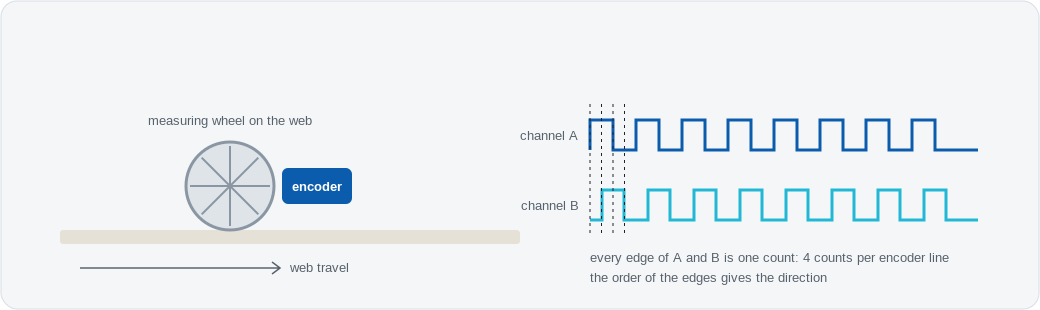
A rotary encoder sits on a measuring wheel that runs on the web. It sends two square-wave channels, A and B, a quarter of a period apart. Counting every rising and falling edge of both channels gives four counts per line of the encoder disc, and the order in which the edges come tells which way the web moves.
The formula
The encoder resolution is the distance the web moves per count:
encoder resolution (nm) = wheel circumference (mm) ÷ (lines per revolution × 4) × 1 000 000
Example: a 2 500-line encoder on a wheel of 200 mm circumference gives 200 ÷ (2 500 × 4) × 1 000 000 = 20 000 nm per count. Use the circumference of the surface that actually touches the web.
From counts to printed lines
At 600 dpi along the web, the line pitch is 25.4 mm ÷ 600 = 42.3 µm. With 20 000 nm per count the board fires a line every 2.12 counts or so. A line pitch is rarely a whole number of counts, so the board carries the fraction forward and places every line at its exact distance instead of rounding each one.
Check it with a print
A formula is only as good as the measured circumference. Print a label with a box of known length along the web — for example 100 mm — and measure it:
correct resolution = set resolution × measured length ÷ designed length
A label that comes out too long means the set resolution is too small. Example: 20 000 nm set, the 100 mm box measures 101.5 mm, so set 20 300 nm and print again.
When a label still drifts
If the correction does not hold, look at the wheel before the numbers: a measuring wheel that slips (too little pressure, a worn tyre, a slippery web) or sits where the web is stretched counts a different distance from the one the head prints on.
In SmartPrint G5
The encoder resolution is one setting: in the SP_app operator software, or in the configuration your own software passes through the SDK. The board accepts encoder edges up to 5 MHz.